
Download WD SmartWare Pro – backup, automatic backup, file backup, data protection, cloud backup, local backup, continuous backup, scheduled backup, USB backup, Dropbox backup
Overview
WD SmartWare Pro is a dedicated backup solution designed to simplify the protection of critical digital files. Developed by WD (Western Digital), the software aims to address the common challenge of data loss due to hardware failure, accidental deletion, or system crashes. By offering both automatic and scheduled backup capabilities, it enables users to maintain consistent data integrity without requiring technical expertise. The app is particularly suited for individuals and small businesses relying on Windows systems who need a reliable method to preserve documents, photos, videos, and other essential files.
Its core function lies in automating the backup process, minimizing user intervention while maximizing data security. The software supports dual backup destinations—local USB drives and cloud storage via Dropbox—providing redundancy and flexibility. This dual approach enhances resilience against data loss, making it a practical tool in both personal and professional environments. Real-world use cases include backing up family photo libraries, business project files, or academic documents on a regular basis.
Although the developer did not provide additional technical details about its architecture or integration with other systems, WD SmartWare Pro has remained a recognized utility within the data protection space since its release in 2013. Its continued presence underscores its effectiveness in delivering straightforward, dependable backup functionality for users seeking peace of mind.
Key Features & Functionality
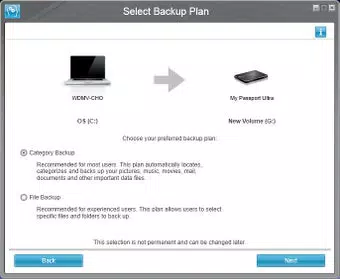
- Flexible Backup Options: Users can manually select specific files, folders, or file types to include in their backup, allowing for precise control over what data is protected. This is ideal for users who want to avoid backing up unnecessary system files or temporary data.
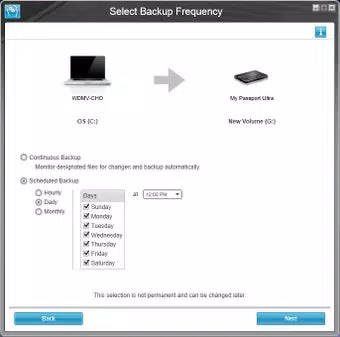
- Continuous Backup: Any changes to selected files are backed up in real time, ensuring that the latest version is always preserved. This is especially beneficial for active users who frequently edit documents or media files.
- Scheduled Backups: The software allows users to define backup intervals—hourly, daily, or monthly—based on their workflow. This automation ensures consistent protection without requiring manual oversight.
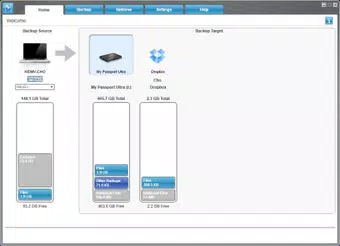
- Cloud and Local Backup Support: Data can be stored on external USB drives for immediate access and physical security, or synchronized with Dropbox for remote access and disaster recovery. This dual strategy strengthens data resilience.
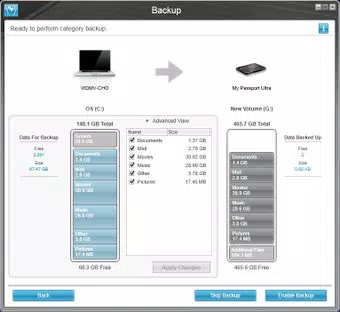
- User-Friendly Interface: The intuitive layout enables quick setup and management of backup tasks. Navigation is straightforward, with clear visual indicators for backup status and progress, reducing the learning curve for new users.
For example, a freelance photographer might use continuous backup to safeguard newly captured images as they are transferred to their computer. Meanwhile, a student could schedule a daily backup of their thesis documents to both a USB drive and Dropbox, ensuring access from multiple devices and protection against local hardware failure.
Interface, UX & Performance
WD SmartWare Pro features a clean, minimalist interface designed for accessibility across skill levels. The main dashboard presents essential functions—such as starting a backup, reviewing backup history, and adjusting settings—in a clearly organized layout. Navigation is linear and consistent, with minimal clutter, allowing users to perform tasks efficiently.
Although the developer did not list formal performance metrics, the software’s lightweight footprint of 12.8 MB suggests optimized resource usage. It is likely to run smoothly on standard Windows systems, including those with modest hardware configurations. The application responds promptly to user inputs, and backup processes appear to operate in the background without significantly impacting system performance.
Stability appears to be a consistent strength, as the app has been in use since 2013 without reported widespread issues. However, the developer did not specify compatibility with modern Windows versions beyond the platform designation. Users should exercise caution when deploying on newer operating systems, as legacy applications may experience unexpected behavior over time.
Platform Compatibility & Technical Requirements
WD SmartWare Pro is designed exclusively for the Windows platform. The current version, 1.0.0.11, is available for download with a file size of 12.8 MB. The developer did not specify minimum OS requirements or hardware specifications, so users should ensure compatibility with their system before installation.
Given its release date in 2013, the software was originally developed for older Windows versions such as Windows 7 and 8. While it may still function on newer systems like Windows 10 or 11, this is not guaranteed. The absence of updated compatibility information means users should verify functionality through testing or community feedback.
For those seeking a secure, lightweight backup tool, the app remains a viable option—especially for users with older hardware or those who prefer simple, no-frills utilities.
Pros and Cons
Pros
- Free to download and use, making it accessible for budget-conscious users.
- Supports both local USB and cloud (Dropbox) backup destinations for enhanced data security.
- Offers continuous and scheduled backup options for flexible data protection.
- Intuitive interface suitable for users with minimal technical experience.
- Lightweight design with a small file size of 12.8 MB.
Cons
- Released in 2013; may lack support for modern Windows features or security protocols.
- Developer did not disclose minimum OS or hardware requirements.
- No official updates or maintenance information provided since release.
- Only available for Windows, limiting cross-platform functionality.
- Cloud integration is limited to Dropbox, with no support for other cloud services.
FAQ
Is WD SmartWare Pro safe to install?
Yes, the software is developed by WD (Western Digital), a reputable company in the storage industry. However, users should ensure they download the app from official sources to avoid tampered versions.
Can I use WD SmartWare Pro on Windows 10 or 11?
While the app is designed for Windows, the developer did not specify compatibility with Windows 10 or 11. It may function on newer systems, but this is not officially confirmed.
Does WD SmartWare Pro support other cloud services besides Dropbox?
Based on the available information, the software only supports Dropbox for cloud backup. No integration with Google Drive, OneDrive, or other platforms is listed.
Is the app free to use?
Yes, WD SmartWare Pro is available at no cost. There are no in-app purchases or subscription fees reported.
How often can I schedule backups?
Users can set backups to run hourly, daily, or monthly, depending on their data protection needs and workflow.
Final Thoughts
WD SmartWare Pro remains a solid choice for users seeking a no-cost, straightforward backup solution on Windows. Its ability to perform continuous and scheduled backups across both USB drives and Dropbox offers a balanced approach to data protection. While its age is a consideration, the app’s simplicity, lightweight design, and free access continue to provide value for users who prioritize reliability over cutting-edge features.
Those who manage sensitive or frequently updated files—such as creatives, students, or small business owners—can benefit from its automated workflows and dual backup strategy. For individuals with older systems or limited technical knowledge, WD SmartWare Pro delivers a practical, low-effort method to safeguard important data.
Despite the lack of recent updates or modern platform support, its core functionality remains intact. If you’re looking for a secure, easy-to-use backup tool without cost or complexity, WD SmartWare Pro is worth considering.
Download WD SmartWare Pro now


